You poured time and creativity into an Instagram Story, and now it is just gone. No warning, no explanation — vanished before its 24 hours were up. If you have felt that specific kind of confusion, you are not alone, and it almost always comes down to one of a small, identifiable set of causes.
In this guide, we walk through all 7 reasons a Story disappears early, what changed in Instagram story-privacy controls going into 2026, a step-by-step way to check your own settings, and — because it matters more than most people realize — how to tell whether a disappearing Story is just a settings quirk or an early sign your account has been compromised.
Quick Answer: 7 Reasons Instagram Stories Disappear
Here is the short version. Each row is covered in full detail, with fixes, further down.
| Reason | What Happens | Quick Fix |
| Violates Community Guidelines | Instagram removes the Story automatically | Use original, policy-safe content |
| Accidental Deletion | You or a co-manager deleted it by mistake | Double-check before confirming deletion |
| App Bugs | The Story disappears early or fails to load | Update the app or reinstall it |
| Archived Too Soon | The Story is manually hidden from public view | Check your Archive and reshare it |
| Outdated App Version | Story glitches, lags, or vanishes | Keep Instagram updated on iOS/Android |
| Scheduling Tool Issues | Story fails to post or disappears unexpectedly | Use verified, Meta-approved scheduling tools |
| Privacy & Algorithm Behavior | The Story is hidden from some viewers, not actually gone | Review audience and Hide Story From lists |
What Changed in Instagram Story Privacy Going Into 2026
Before going through the 7 reasons one by one, it is worth understanding what is different about Story visibility today compared with a couple of years ago. Instagram has not rebuilt Stories from scratch, but it has made audience controls more granular — and more of them now live in places people do not check by default.
The “Hide Story From” List Is More Prominent
Instagram’s per-person hiding list lets you stop specific people from seeing your Story without unfollowing or blocking them outright. Because this control sits close to Close Friends and other Story options, it is easier to change by accident while adjusting privacy settings.
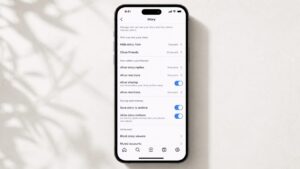
Image placement: Story privacy settings. Alt text: Instagram Settings, Privacy, Story menu 2026.
Muted Story Viewers Are Separate From Blocking
Muting a person’s Stories, hiding your Story from someone, and blocking an account are different actions. Mixing them up is a common reason people think a Story has “disappeared” for one follower when it is actually a visibility setting or viewer-side preference.
Public vs. Private Accounts Behave Differently by Default
On a public account, Stories can be visible beyond approved followers. On a private account, Stories are limited to approved followers. If you switch between public and private after posting, visibility can become confusing because future Stories and already-posted Stories may not behave exactly the way users expect.
Story Visibility Is Increasingly Algorithm-Influenced
Instagram Stories are not always shown in strict chronological order. Viewers who interact with your content often — through replies, reactions, DMs, or profile visits — are more likely to see your Story near the front of their tray. A Story that looks “gone” for one person may simply be ranked lower in their queue.
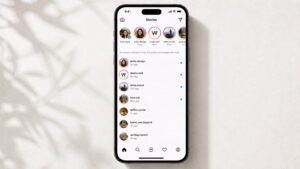
Image placement: Story tray example. Alt text: Instagram Story tray showing algorithmic order.
The 7 Reasons Explained, With Step-by-Step Fixes
1. Content Removed for Violating Community Guidelines
When a Story includes copyrighted material, graphic imagery, misleading content, or anything flagged under Instagram’s rules, it can be taken down automatically. This can feel confusing because users do not always notice the account-status message immediately.
Step-by-step check:
- Open your Account Status page from Instagram settings or Account Center.
- Look for any warning about removed content, restricted reach, or a content decision.
- If a strike appears, check whether it references music, copyright, graphic content, spam, or another guideline category.
- If Instagram offers a review option, request a review only if you believe the decision was wrong.
- Going forward, use original media or Instagram’s licensed audio options rather than third-party files you do not have rights to use.
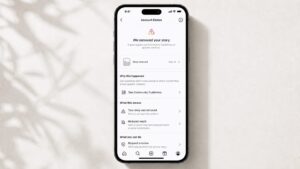
Image placement: Account Status screen. Alt text: Instagram Account Status screen showing a removed Story notice.
2. Deleted by Accident
It is easy to delete a Story by mistake, especially when managing several slides, a business account with multiple admins, or Highlights at the same time.
Step-by-step check:
- Open your profile and tap your Story ring, or go to your active Story tray.
- Tap the three-dot menu on the Story in question.
- If the Story is not there, check the Archive. A deleted Story usually will not appear there, which helps separate deletion from archiving.
- If your account has multiple admins or shared access, ask co-managers before assuming a platform bug.
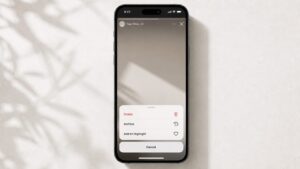
Image placement: Story options menu. Alt text: Instagram Story options menu showing Delete, Archive, and Add to Highlight.
3. App Glitches or Technical Bugs
Temporary Instagram bugs, syncing issues, or a stale app cache can make a Story disappear early, fail to upload, or fail to load for viewers.
Step-by-step check:
- Force-close the Instagram app and reopen it.
- Go to your phone’s app store and check whether an Instagram update is pending.
- Clear the app cache on Android, or offload/reinstall the app on iOS if the issue keeps happening.
- Restart your device before reposting the Story.
- If the problem continues, test with a low-risk Story and ask a trusted follower to confirm whether it remains visible.
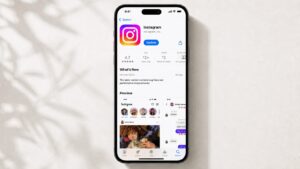
Image placement: App update screen. Alt text: Instagram app update available in app store.
4. Story Archived Too Soon
Manually archiving a Story removes it from public view immediately, even if the full 24 hours have not passed. This sometimes happens when someone taps the wrong option in the Story menu.
Step-by-step check:
- Go to your profile and tap the menu icon in the top right.
- Tap Archive, then switch to the Stories tab.
- Find the Story by date. If it is there, it was archived, not deleted.
- Open the Story, then share it again or add it to a Highlight so it does not disappear from your profile after 24 hours.

Image placement: Story Archive tab. Alt text: Instagram Story Archive tab showing a grid of past Stories.
5. Using an Outdated Version of the App
An older Instagram build can cause Stories to lag, fail to render for some viewers, or disappear earlier than expected due to performance or compatibility issues.
Step-by-step check:
- Open the App Store on iOS or Google Play on Android.
- Search for Instagram and check whether the button says Update instead of Open.
- Turn on automatic app updates so you do not miss bug fixes.
- After updating, restart your device once before reposting or testing your Story again.
6. Problems With Third-Party Scheduling Tools
Scheduling tools save time until they do not sync properly with Instagram’s systems. When that happens, a Story may post incorrectly, publish late, fail to appear, or vanish sooner than expected.
Step-by-step check:
- Confirm the scheduling tool is Meta-approved or officially supports Instagram Story publishing.
- Test a non-critical Story on a secondary account before scheduling anything important.
- Check the tool’s own status page for API outages around the time your Story vanished.
- If problems repeat, post manually for a few days to isolate whether the scheduler is the cause.
7. Privacy Settings & Algorithm Behavior
This is the reason people misdiagnose most often: the Story usually is not gone at all. It may simply be invisible to a specific person because of Close Friends, Hide Story From, muting, or where the algorithm ranked it in that person’s Story tray.
Step-by-Step Visual Guide: Checking Your Story Audience Settings
- Open your profile, tap the menu icon, then go to Settings and activity.
- Tap Privacy, then scroll to Story.
- Review Hide story from and confirm no one you actually want to reach is on that list.
- Check whether Close Friends was left on from a previous Story.
- Under messages and Story replies, confirm your reply settings match what you intend.
- Post a test Story and ask a follower who is not on any restricted list to confirm they can see it.
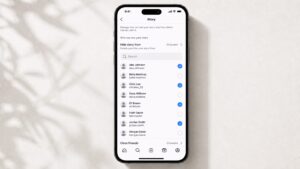
Image placement: Hide Story From list. Alt text: Instagram Hide Story From list with selected people hidden from Stories.
What Else to Check
- Engage with your audience regularly. Replies, reactions, and profile visits can help your Stories appear higher in followers’ trays.
- Double-check visibility settings before publishing if you are scheduling or bulk-uploading content.
- Add important Stories to Highlights on your profile so they remain visible after the normal 24-hour window.
When to Worry vs. When Not to Worry
Not every disappearance needs action. Use this table to triage quickly.
| Scenario | Worry Level | Why | What to Do |
| Story vanished after exactly 24 hours | Do not worry | This is normal, expected behavior | Nothing — save it to Highlights if you want it to stay |
| Story missing for one specific follower only | Do not worry | Likely Hide Story From, Close Friends, muting, or algorithm ranking | Check your audience settings |
| Story gone within minutes, no notification | Worry a little | Possible guideline violation or app bug | Check Account Status and update the app |
| Story missing and you cannot find it in Archive | Worry a little | May be accidental deletion | Confirm with co-admins; it may not be recoverable |
| Multiple Stories vanish and your password stops working | Worry seriously | Possible account compromise | Secure your account immediately |
| Stories you did not post appear, then disappear | Worry seriously | Strong sign of unauthorized access | Change your password and check login activity now |
When Is a Disappearing Story a Sign Your Account Was Hacked?
Most disappearing Stories are explained by the reasons above. But occasionally, it is an early symptom of something more serious: someone else has access to your Instagram account.
Signs it may be a compromise rather than a settings or app issue:
- Stories disappear or change and you did not touch them, especially alongside posts or Highlights you do not recognize.
- Your password suddenly stops working, or you are logged out of sessions you did not end.
- You get a login alert or two-factor code for a login attempt you did not make.
- Your bio, profile picture, linked email, or phone number changes without your involvement.
- Followers message you about Stories or DMs you never sent.
If you recognize more than one of these, treat it as a compromise, not a bug:
- Change your password immediately from a device you trust.
- Turn on two-factor authentication under Account Center or password/security settings.
- Check where you are logged in and log out of any session you do not recognize.
- Review connected third-party apps and remove anything unfamiliar, especially “follower booster” or “growth tool” apps.
- If you are locked out entirely, use Instagram’s official account recovery flow rather than any third-party “unlock” service.
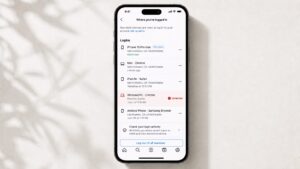
Image placement: Login activity screen. Alt text: Instagram login activity and sessions screen with an unfamiliar login highlighted.
For a closer look at login-related lockouts specifically, add an internal link here to your guide on logging in to Instagram on PC.
How to Stop Your Instagram Stories From Disappearing Again
- Save important Stories to Highlights the moment you post them, so the 24-hour limit stops being a risk.
- Keep the Instagram app on auto-update so bugs and compatibility issues get patched before they cost you a Story.
- Check your Archive weekly. It is the fastest way to tell the difference between “archived” and “actually gone.”
- Plan Story content around topics your audience already engages with. Your Instagram Hashtag Generator can help creators brainstorm tags and topics that support engagement.
- If you are repurposing older public content into new Stories, tools like your Instagram Reels Downloader, Caption Saver, and Bio Copier can speed up research and drafting. Always respect the original creator’s rights.
Frequently Asked Questions
Why is my Instagram Story not showing up for anyone?
Do Instagram Stories disappear on their own?
Does Instagram randomly delete Stories?
Where did my Story go if I cannot find it anywhere?
Why did my Instagram Story disappear before 24 hours were up?
Can one follower stop seeing my Story while everyone else still can?
Is a disappearing Story ever a sign of being hacked?
Do private accounts lose Stories differently than public accounts?
Will updating Instagram fix a disappearing Story?
Should I stop using scheduling tools if my Story disappeared after posting through one?
Final Thoughts
Seeing a Story vanish before its time is frustrating, especially after you have put real effort into it. But once you know the real reasons — from guideline takedowns to the more nuanced 2026 privacy and algorithm behavior — it gets much easier to diagnose in seconds instead of guessing.
Have you lost a Story unexpectedly? Which fix worked for you? Let us know in the comments — it helps other readers land on the right answer faster.
About the Author
The Instachecker Editorial Team researches Instagram features, reviews official documentation, and updates tutorial-style articles as the app changes. This article was reviewed for accuracy in July 2026 and written to help readers troubleshoot Story visibility issues safely and practically.
Sources and Editorial References
- Instagram Help Center — Stories
- Instagram Help Center — How long Instagram stories remain visible
- Instagram Help Center — Hide your Instagram story from someone
- Instagram Help Center — Mute or unmute someone’s Instagram story
- Instagram Help Center — Check your Account Status on Instagram
- Instagram Help Center — What to do if you do not think Instagram should have taken down your content
- Instagram Help Center — View your Instagram account’s recent login activity
- Instagram Help Center — Add a story to your Story Highlights