Fake Instagram messages have become increasingly sophisticated, making it more challenging than ever to distinguish what’s real from what’s a trap. Falling for these scams can put your data, your account, and even your privacy at serious risk. That’s why knowing how to spot fake Instagram messages is essential.
In 2026, fake Instagram DMs can include phishing links, fake giveaways, fake brand deals, romance scams, account recovery tricks, AI-generated voice notes, deepfake-style video calls, and polished chatbot replies. The goal is usually the same: to make you click a link, reveal a code, send money, or move the conversation away from Instagram.
Why You Can Trust This Guide
- The advice is based on official Instagram/Meta safety guidance, Instagram Help Center reporting instructions, and FBI warnings about AI-enabled scams.
- The examples are recreated from common scam patterns. They are not presented as screenshots from real victims, and personal details are blurred or fictional.
- The article focuses on actions readers can verify themselves: profile review, link checking, message behavior, reporting steps, and account security settings.
- For serious account compromise, financial loss, blackmail, or identity theft, readers should contact the platform, their bank, local authorities, or a qualified security professional.
60-Second Checklist: Is This Instagram Message Fake?
If you are in a hurry, use this checklist before replying, clicking, or sharing any information.
- Did the message arrive from an account you do not know or from Message Requests?
- Is the sender asking you to click a link, verify your account, claim a prize, or act urgently?
- Does the profile have very few posts, a strange username, copied photos, or low-quality engagement?
- Is the message asking for your password, 2FA code, payment details, gift cards, crypto, or personal documents?
- Does the sender want to move the conversation to WhatsApp, Telegram, Signal, or another app immediately?
- Is there a voice note, video call, or screenshot that feels convincing but slightly unnatural?
- Does the link look different from official Instagram, Meta, Facebook, or the real brand domain?
- Would the offer still make sense if you waited 10 minutes and checked it independently?
Quick rule: If two or more answers are yes, treat the message as suspicious. Do not click the link, do not reply with personal information, and report the message inside Instagram.
What Are the Key Tips to Spot Fake Instagram Messages?
Most fake Instagram messages rely on pressure. The scammer wants you to act before you have time to think. That pressure may come from fear, excitement, romance, curiosity, or the promise of quick money.
A real message usually gives you room to verify it. A fake message often does the opposite. It pushes you to click now, pay now, verify now, send a code now, or keep the conversation secret.
When reviewing a suspicious DM, look at three things together: the message, the profile, and the action the sender wants you to take. One odd detail may not prove anything, but several red flags together are a strong warning sign.
Visual and Behavioral Signs of Fake Instagram Messages
The fastest way to avoid most Instagram DM scams is to recognize the patterns early. Start with the message itself, then check the sender profile before you interact.
Suspicious Message Behavior
- The message appears in Message Requests instead of your primary inbox.
- The sender uses urgent, pushy, emotional, or threatening language.
- The message asks you to click a link, download a file, or open a form.
- The sender asks for your password, 2FA code, recovery code, bank details, or personal documents.
- The account says you won a prize, your account will be suspended, or you must act before a deadline.
- The sender asks you to move the conversation to WhatsApp, Telegram, Signal, email, or a separate website too quickly.
- The link is shortened, misspelled, or close to a real domain but not exactly right.
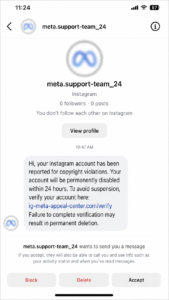
Recreated example based on common scam patterns: fake account suspension DM using urgency and a suspicious verification link.
Profile Clues
- The profile photo is missing, generic, copied, or recently changed.
- The account has few posts, copied posts, or content that does not match what the sender claims.
- The username includes extra dots, underscores, numbers, misspellings, or brand-like words.
- The bio feels vague, generic, or copied from another account.
- The account has very low followers, a strange following ratio, or no meaningful interaction history.
- The account claims to be support, a celebrity, or a brand, but it is not linked from an official website or verified profile.
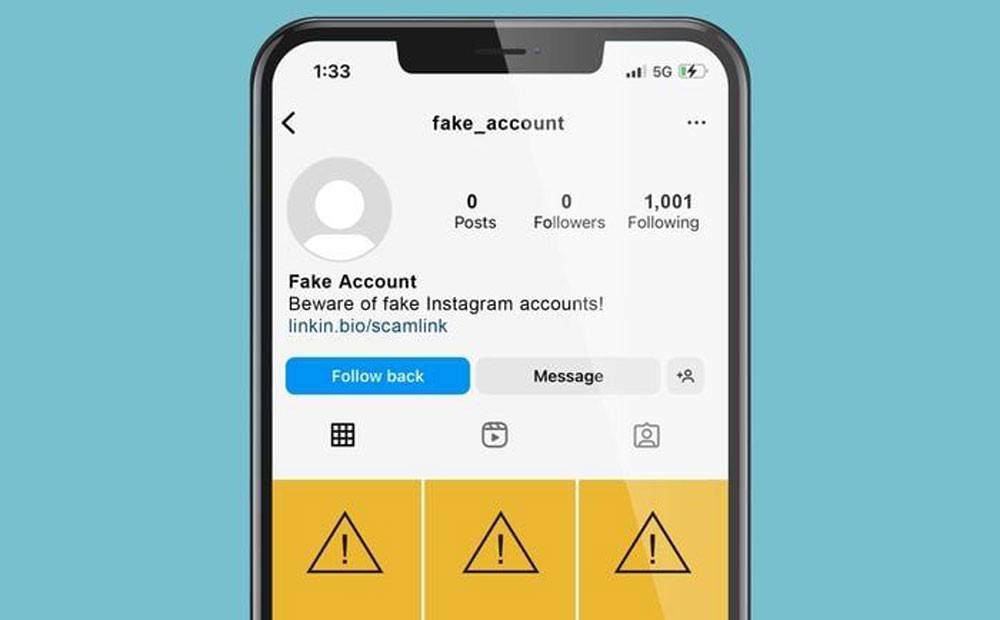
Existing article image: fake-looking Instagram account with suspicious profile indicators.
Engagement and Activity Patterns
- An account with thousands of followers but very low likes, comments, or story interaction may be suspicious.
- Generic comments such as ‘Nice post’, ‘DM us’, or repeated emoji-only comments can point to bot activity.
- Sudden follower spikes or engagement that does not match the content can suggest purchased engagement.
- If the account claims to be a brand, creator, or celebrity, check whether it is linked from the brand’s official site or other verified channels.
Common Scams Behind Fake Instagram Messages
Not every fake DM looks the same, but most fall into a few familiar categories. These are the ones readers should learn to recognize first.
- Fake Giveaways and Prize Alerts: The message says you won a phone, cash, a gift card, a vacation, or a luxury item, but you must click a link or pay a fee first.
- Fake Account Recovery Messages: The sender pretends to be Instagram or Meta support and says your account will be disabled unless you verify it through a fake link.
- Fake Brand Collaboration Offers: A fake manager offers a paid partnership, then asks for a registration fee, shipping fee, or login through a suspicious portal.
- Job Scams: A fake recruiter offers remote work, creator payments, or easy income, then sends you to a phishing site or asks for upfront payment.
- Dating and Romance Scams: A friendly or romantic message builds trust over time, then asks for money, crypto, private photos, or off-platform messaging.
- Fake Follower Ads: The sender promises instant growth or cheap followers, but the result can damage your account and lower real engagement.
- Crypto and Investment Scams: The account shows fake profits and asks you to deposit money, share wallet details, or join a private investment group.
- Generic Marketing Messages: The DM sounds vague, impersonal, and automated, often because it was sent by a bot or AI chatbot.
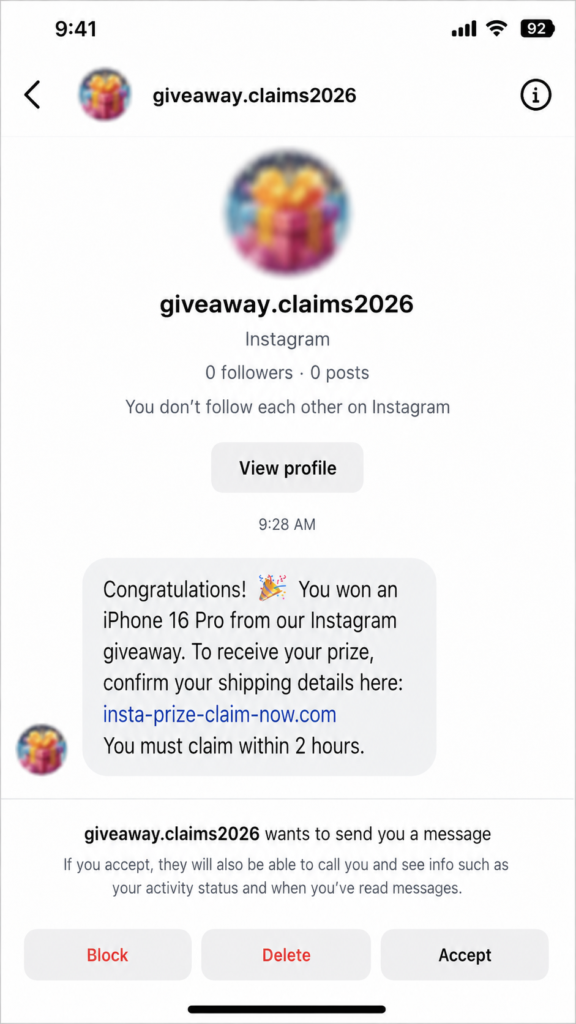
Recreated example based on common scam patterns: fake giveaway message using a prize, short deadline, and suspicious link.
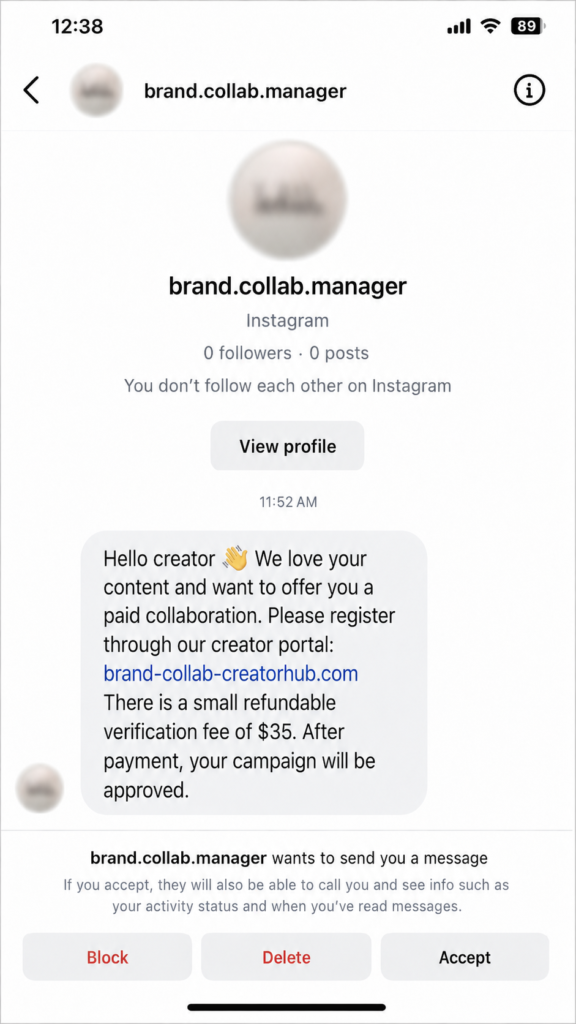
Recreated example based on common scam patterns: fake brand collaboration message asking for a refundable verification fee.
New Instagram Message Scams in 2026: AI Voice Notes, Deepfake Calls, and Smart Bots
Fake DMs are no longer limited to bad grammar and obvious spam. In 2026, scammers can use AI tools to make messages sound more personal, more urgent, and more believable.
The FBI has warned that criminals are using fake social profiles, voice clones, identification documents, and believable videos to make scams harder to detect. That matters on Instagram because trust is often built through profile photos, voice notes, video calls, and screenshots.
The safest mindset is simple: do not treat a voice, video, screenshot, or polished message as proof by itself. Verify the request through a second trusted channel before taking action.
1. AI Voice Note Scams
Some scammers send voice messages that sound like a friend, influencer, brand manager, or family member. The voice may ask you to send money, share a code, buy a gift card, or click a private link.
- The voice sounds close to real, but the tone feels flat, rushed, or slightly robotic.
- The message creates panic: ‘I am locked out’, ‘I need help now’, or ‘Do not tell anyone’.
- The person avoids answering a specific question only the real person would know.
- The sender asks for a verification code, password reset code, or 2FA code.
- They push you to continue on another app before you can verify their identity.
If you receive a suspicious voice note, do not trust the voice alone. Call the person through a saved phone number, check another verified channel, or ask a question that cannot be guessed from public information.
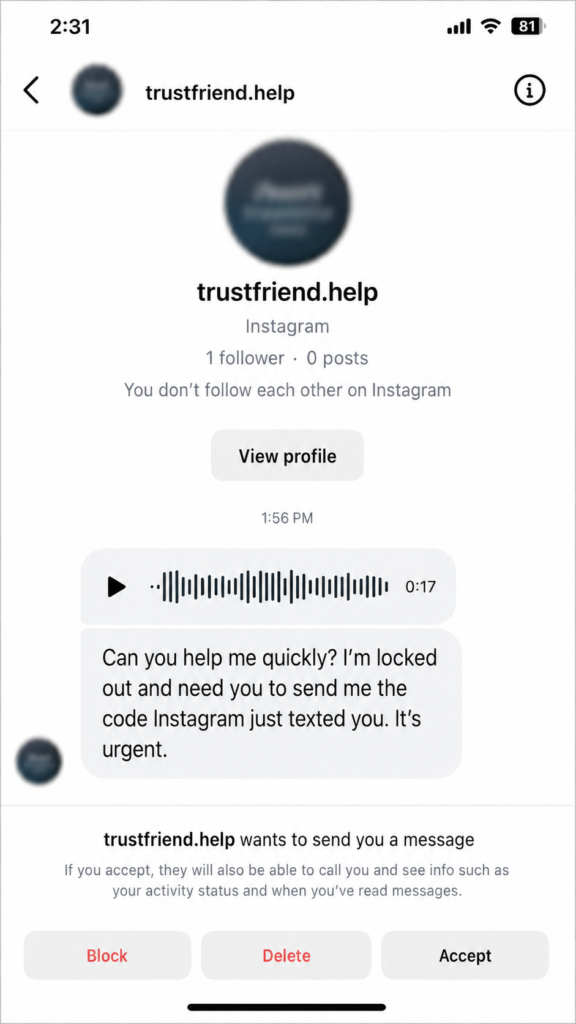
Recreated example based on common scam patterns: AI voice note scam asking for a verification code.
2. Deepfake Video Call Scams
Scammers may use fake video clips, stolen footage, or AI-generated faces during calls to impersonate celebrities, influencers, brand representatives, romantic partners, or business contacts. These calls are designed to build trust quickly.
- Unnatural blinking, mouth movement, lighting, or facial expressions.
- Poor synchronization between the voice and lips.
- A short call that ends quickly when you ask detailed questions.
- Pressure to pay a verification fee, collaboration fee, shipping fee, or investment deposit.
- Requests to keep the conversation secret or move to another app immediately.
| Remember: A video call is not proof that someone is real. Deepfake tools and stolen clips can make fake identities look convincing. |
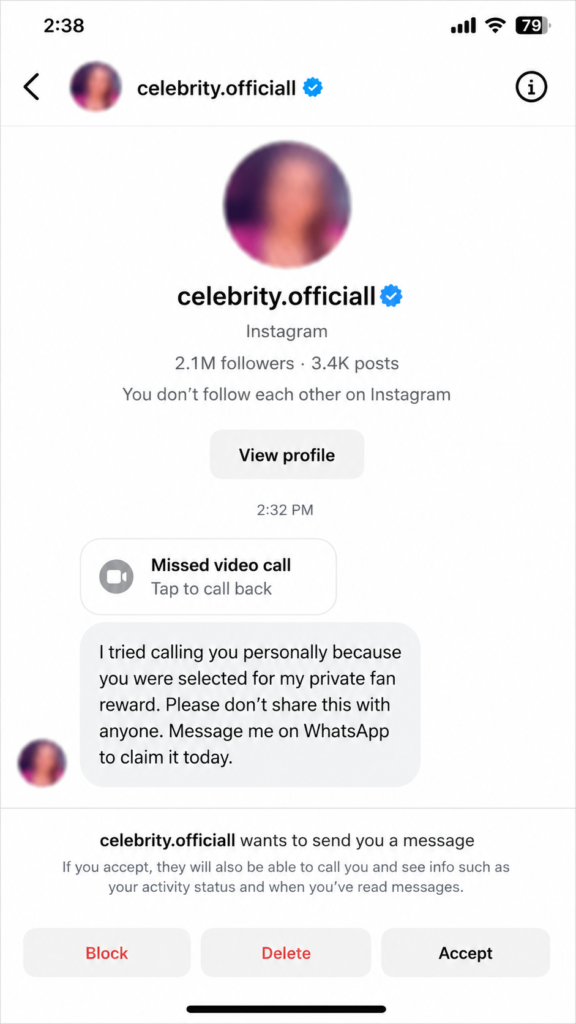
Recreated example based on common scam patterns: fake celebrity-style DM using a missed video call and a request to move to WhatsApp.
3. AI Chatbot DMs
AI chatbots can send polished, personalized messages at scale. A fake DM may mention your niche, recent posts, city, business, or interests to make the message feel real.
- We reviewed your profile and want to offer you a paid collaboration.
- Your account has violated our policy. Verify now to avoid suspension.
- You have been selected for a creator bonus.
- I saw your post and have an investment opportunity for you.
- Your payment is pending. Confirm your details here.
The wording may look professional, but the goal is usually the same: make you click a link, share sensitive data, send money, or move the conversation away from Instagram.
How to Protect Yourself from AI-Based Instagram Scams
- Use a simple rule: if a message creates urgency, asks for money, requests a code, or pushes you to click a link, verify it outside Instagram first.
- Turn on two-factor authentication for your Instagram account.
- Never share your Instagram password, 2FA code, password reset code, or backup code.
- Avoid clicking links from unknown accounts or message requests.
- Check the sender’s username, profile history, engagement quality, and official links.
- Ask a specific question only the real person would know.
- Use a family or team safe word for urgent money requests.
- Report suspicious messages directly inside Instagram.
How to Investigate a Suspicious Instagram Account
Before you reply to a suspicious message, spend one minute checking the profile. This is often enough to spot a fake account, a copied profile, or a bot.
The goal is not to become a detective. The goal is to decide whether the sender has earned your trust. If the answer is no, do not click anything and do not share personal information.
- Check the profile photo, bio, posts, highlights, username, follower count, and following ratio.
- Open recent posts and look at the comments. Are they specific and natural, or generic and repetitive?
- Review followers and commenters. Do they look like real people with bios, posts, and genuine interactions?
- Look for unnatural follower growth, sudden spikes, or accounts with random followers and almost no engagement.
- Use Instagram audit tools only as a supporting signal. Do not rely on a single tool to prove whether an account is real.
- Check whether a brand, celebrity, or influencer profile is linked from an official website or verified social profile.
- Do not click links or download files included in suspicious messages.
- Avoid replying to scammers. Responding can confirm that your account is active.
- Report suspicious messages and fake accounts through Instagram’s in-app reporting tools.
Existing article image: use near the investigation, profile review, or safety section.
How to Spot a Fake Celebrity Message on Instagram
Fake celebrity accounts often send direct messages to random users. They may claim they noticed your profile, selected you for a private fan reward, or want to give you a prize. Some ask for donations, shipping fees, fan club payments, crypto transfers, or personal information.
A real public figure rarely messages strangers out of nowhere with a secret offer. If the message asks you to keep things private, pay a fee, or move to WhatsApp, treat it as a scam until proven otherwise.
- Check the username carefully for extra letters, underscores, numbers, or misspellings.
- Do not rely only on a blue-looking badge in a screenshot; screenshots can be manipulated.
- Search the celebrity or brand’s official website and see which Instagram account is linked there.
- Be suspicious of messages asking for secrecy, donations, gift cards, crypto, or WhatsApp contact.
- Never pay a fee to claim a fan reward, private call, prize, or meet-and-greet.
What Are Fake Instagram Chat Generators?
Fake Instagram chat generators are websites or tools that let someone create realistic-looking Instagram DM screenshots by editing usernames, profile photos, timestamps, verification badges, and message content.
This matters because scammers may use screenshots as ‘proof’ of a payment, partnership, giveaway, or celebrity conversation. A screenshot can look perfect and still be fake.
- Ask for proof inside the actual Instagram app, not just a screenshot.
- Check the sender’s live profile and message history.
- Look for mismatched fonts, icons, spacing, timestamps, and usernames in screenshots.
- Remember that realistic screenshots can be recreated, edited, or generated.
How Fake Messages and Fake Followers Can Damage Your Instagram
Scammers often combine fake DMs with offers to sell fake followers, fake engagement, or rapid growth services. The promise sounds tempting, especially for new creators and small businesses, but it can damage your account over time.
Fake followers do not become customers, fans, or real community members. They can make your profile look less trustworthy and make your analytics harder to understand.
- They can damage your Instagram reputation.
- They can lower your real engagement rate.
- They can make audience insights inaccurate.
- They can increase the risk of your account being flagged, restricted, or banned.
- They can make future brand collaborations less credible.
The safer long-term strategy is simple: build real followers with useful content, consistent posting, and authentic interaction. Spotting fake messages early helps protect that trust.
Can You Get Hacked Just by Opening an Instagram Message?
Opening a direct message on Instagram by itself is usually not what compromises an account. The real risk starts when you click a suspicious link, download a file, enter your login details on a fake page, approve a suspicious app, or share a verification code.
That said, do not treat unknown DMs casually. If the message feels off, avoid interacting with it, especially if it asks you to leave Instagram or enter sensitive information somewhere else.
Who Can See My Instagram Messages?
Instagram Direct Messages are private to the people in the conversation. However, if your account is hacked, an attacker may be able to access your DMs, saved media, profile settings, connected apps, and contact information.
That is why account security matters even if you rarely use DMs. Protecting your login protects your conversations too.
- Use a strong, unique password.
- Turn on two-factor authentication.
- Keep your recovery email and phone number updated.
- Review connected third-party apps and remove anything you do not recognize.
- Check for unknown login sessions regularly.
What to Do If You Clicked a Suspicious Instagram Link
- Do not enter your password, verification code, payment details, or personal documents on the page.
- If you already entered your password, change it immediately from the official Instagram app or website.
- Log out of unknown devices from Instagram settings.
- Turn on two-factor authentication if it is not already enabled.
- Check that your email address and phone number have not been changed.
- Revoke access from suspicious third-party apps.
- Report the message or chat inside Instagram.
- Warn friends if your account sent suspicious messages to them.
- If money, identity documents, or blackmail are involved, contact your bank, local authorities, or a qualified security professional.
How to Report a Fake Instagram Message
Instagram offers in-app reporting for messages and chats. The exact menu labels can change, but the basic process is to open the conversation, use the profile or options menu, choose Report, and follow the prompts.
- Do not reply to the scammer before reporting.
- Take a screenshot for your own records if money, threats, or account compromise are involved.
- Use Instagram’s reporting tools rather than confronting the sender.
- Block the account after reporting if you do not need to keep the conversation visible.
Conclusion
Fake Instagram messages work because they create emotion. They make you feel excited, afraid, flattered, rushed, or curious. The best defense is to pause before you act.
Check the sender. Check the link. Check the request. If a message asks for money, passwords, verification codes, personal documents, or urgent action, verify it through a trusted channel before doing anything.
A few careful seconds can protect your Instagram account, your private messages, your money, and your reputation.
Frequently Asked Questions About Fake Instagram Messages
How can I check if someone is real on Instagram?
How do I know if an Instagram DM is from a bot?
How can I spot fake comments on Instagram?
Can I spot fake Instagram messages?
Can I trace who sent a fake Instagram message?
How can I avoid scams on Instagram?
Can scammers use AI voice notes on Instagram?
Can an Instagram video call be fake?
What should I do if a message claims to be from Instagram support?
Is it safe to reply to a suspicious Instagram message?
Sources Used for Fact-Checking
Use these sources as editor references and, where appropriate, link to them from the live article.
- Instagram Help Center: Avoid getting scammed on Instagram
- Instagram Help Center: Report a message or chat on Instagram
- Instagram Help Center: Protect yourself from phishing on Instagram
- About Instagram: Protect Your Instagram Account from Phishing & Scams
- About Instagram: Account Safety & Security
- FBI: Cryptocurrency and AI Scams Bilk Americans of Billions
- FBI: Increasing Threat of Cyber Criminals Utilizing Artificial Intelligence
- FBI: Artificial Intelligence – indicators of deepfakes